on
Scheduling unschedulable, FreeRTOS scheduler
Hello there! Some time ago I was pursuing a Bachelor’s degree in the Gdańsk University of Technology. And as a thesis I chose to focus on FreeRTOS kernel and its scheduler. Back then I was interested in complex systems designs including the operating systems schedulers implementations and testing. So happened that I knew the operating systems architectures only on paper and wanted to touch and examine them in real life. Thanks to the FreeRTOS simple design and good documentation I managed not only to learn how a real (the FreeRTOS’s one) scheduler work, but to swap the original scheduler in the FreeRTOS kernel with my own implementations of the well-known and not so algorithms, including: First Come First Served (aka. FCFS or FIFO), EDF (aka. Earliest Deadline First), Least Slack Time (or Least Laxity First; aka. LST or LLF), and many more!
This post will cover only the introduction. Firstly I will explain to you the general concepts about scheduling in operating systems, and then we will take a look at how scheduling works in the FreeRTOS kernel. For the impatient ones and the ones who can read in the Polish language: check my thesis.
Enjoy!
What is the scheduler?
 Quickly created.
The main guest in this post will be the scheduler of an operating system. The scheduler is like a traffic flagman on an intersection, where the cars are your applications you are running on your personal computer, smartphone or any interactive piece of electronics. Depending on the flagman actions some cars are moving hence reaching their final destination, while others are waiting. The idea is to optimize the efficiency not of this specific intersection but to optimize traffic in the entire town to make sure everyone reaches their destination in the optimal time.
The scheduler in operating systems serves a similar role - it manages the execution of applications or, in the smaller systems, tasks. So the result will be acquired in the most optimal time.
There is a large number of specific schedulers that are designed for specific systems (the interactive systems are the most popular example). But I will focus on the schedulers that serve a specific operating system called Real Time Operating Systems (aka. RTOS).
Real time?
I think the definition should be explained briefly before continuing. Here are some of the definitions found on the internet:
From the wikipedia.org:
Real-time computing (RTC) is the computer science term for hardware and software systems subject to a “real-time constraint”, for example from event to system response. Real-time programs must guarantee response within specified time constraints, often referred to as “deadlines”.
From 24765-2017 - ISO/IEC/IEEE:
3.3327
real-time
- problem, system, or application that is concurrent and has timing constraints whereby incoming events must be processed within a given timeframe
- pertaining to a system or mode of operation in which computation is performed during the actual time that an external process occurs, in order that the computation results can be used to control, monitor, or respond in a timely manner to the external process
From TCRTS (aka. Technical Community on Real-Time Systems):
Real-Time System: is a computing system whose correct behavior depends not only on the value of the computation but also on the time at which outputs are produced.
These are just a few definitions that can be found on the internet, but I think they explain the main point precisely enough: the focus in real time applications is on time, and more precisely on the time determinism. What does “time determinism” mean? Well, shortly it means that every event arrival in time can be computed and/or controlled, hence determined.
Therefore, by projecting the definition of real time systems on the operating systems we get the real time operating systems also known as RTOSes. That is, these are the operating systems where, among other important features, the time determinism is the most important. This breaks the common misconception about RTOSes: RTOSes do not focus on how fast you will get the result, they focus on when you get the result.
Why RTOS’es?
There is a great variety of operating systems out there. Why RTOSes then? The operating system is a complex topic. Most of the time it has a large codebase, several layers of abstractions, a large amount of APIs, etc.. And all of this varies by the hardware architecture every operating system is built to run on and specific software implementation.
Hence, I wanted to skip all these huge general purpose operating systems and all the edge case implementations: to omit huge and undocumented stacks and make my experiments easier. And the RTOSes are very popular and mostly built according to microkernel architecture principles. That means they are small, simple and most of the time have only the core components implemented, including the scheduler. Moreover, most of the time, the scheduler is the main focus in RTOS’es.
So, the RTOSes are just a shortcut to experiments with the scheduler.
Where the scheduler lives?
 An architecture diagram. P.S. I do not know how the ARM Exception Levels got
here.
An architecture diagram. P.S. I do not know how the ARM Exception Levels got
here.
The above image is yet another classical software architecture diagram. But with one difference: I put some arrows that outline how CPU resources are being assigned in this software hierarchy:
- The hypervisors are responsible for separating virtual machines environments, including its execution context. Hence, hypervisors typically have a separate chunk of code that contains either a static assignment of the CPU resources or a scheduler.
- Hypervisors often are used to run several operating systems in separate environments.
- Sometimes hypervisors are used to launch bare-metal applications as well.
- When an operating system is being launched on top of a hypervisor we have another layer, where the CPU resources are shared - the scheduler in the operating systems.
There are other architectures with more complex CPU resources sharing (e.g. the nested virtualization), but I did not want to over complicate the introduction. Going further - I want to drop the hypervisor from this post as well, as I have not touched the nested scheduling yet. In fact, the RTOS’es architectures allow to drop all drivers and services as well, and study the scheduling in a laboratory environment, so the architecture becomes much simpler:
 Yet another architecture diagram.
Quick guide into FreeRTOS
FreeRTOS is a microkernel designed for real-time application on MCUs. To run several tasks simultaneously on one core you need:
-
Add the starting point:
int main(void){ while (1){} } -
Add the tasks:
void Task1(void *pvParameters); void Task2(void *pvParameters); int main(void){ while (1){} } void Task1 (void *pvParameters){ while (1){ vTaskDelay(pdMS_TO_TICKS( 1 )); } vTaskDelete(NULL); } void Task2 (void *pvParameters){ while (1){ vTaskDelay(pdMS_TO_TICKS( 4 )); } vTaskDelete(NULL); } -
Register the tasks:
void Task1(void *pvParameters); void Task2(void *pvParameters); int main(void){ xTaskCreate(Task1, "Task1", TASK_STACK_LENGHT_WORDS, NULL, 1, NULL); xTaskCreate(Task2, "Task2", TASK_STACK_LENGHT_WORDS, NULL, 0, NULL); while (1){} } void Task1 (void *pvParameters){ while (1){ vTaskDelay(pdMS_TO_TICKS( 1 )); } vTaskDelete(NULL); } void Task2 (void *pvParameters){ while (1){ vTaskDelay(pdMS_TO_TICKS( 4 )); } vTaskDelete(NULL); } -
Start the scheduler:
void Task1(void *pvParameters); void Task2(void *pvParameters); int main(void){ xTaskCreate(Task1, "Task1", TASK_STACK_LENGHT_WORDS, NULL, 1, NULL); xTaskCreate(Task2, "Task2", TASK_STACK_LENGHT_WORDS, NULL, 0, NULL); vTaskStartScheduler(); while (1){} } void Task1 (void *pvParameters){ while (1){ vTaskDelay(pdMS_TO_TICKS( 1 )); } vTaskDelete(NULL); } void Task2 (void *pvParameters){ while (1){ vTaskDelay(pdMS_TO_TICKS( 4 )); } vTaskDelete(NULL); } -
Enjoy watching the tasks fight for the CPU time.
For more technical information refer to the:
Launching a minimal build on QEMU
Note: This chapter contains some scary traces. If you do not understand smth. - please refer to QEMU documentation and man pages and search for
-d exec. For me the fact that this debug option gives you the information about executed C functions on the emulated architecture is enough.
You can launch a minimal demo from my graduate work repository by following the following steps:
-
Download the pre-compiled ELF:
wget https://github.com/DaniilKl/GraduateWork/raw/46e5e9ca415f71cd50629712d33d7f8538e86fde/Code/LM3S6965_GCC_QEMU/FreeRTOS_QEMU.elfNote: This ELF has been compiled from here using a modified FreeRTOS kernel 202212.01 from here.
-
Launch the QEMU:
timeout 5s qemu-system-arm -kernel ./FreeRTOS_QEMU.elf -s -machine lm3s6965evb -nographic -d exec -D qemu.log < /dev/null &Note: I used
QEMU emulator version 10.1.3 (qemu-10.1.3-1.fc43). Thetimeout 5sis needed because otherwise the QEMU call will flood theqemu.logfile with traces.
After that you will have the qemu.log file with the following types of
content:
-
Some system tasks (note, that I will hide some parts of the traces for convenience in the following code blocks):
(...) Trace 0: 0x7aadb800dd80 [00800400/0000129a/00000110/ff000000] prvInitialiseTaskLists Trace 0: 0x7aadb800d600 [00800400/00001458/00000110/ff000000] vListInitialise (...) Trace 0: 0x7aadb8010480 [00800400/0000017e/00000110/ff000000] xTaskCreate Trace 0: 0x7aadb8010700 [00800400/00001b86/00000110/ff000000] main Trace 0: 0x7aadb8001d40 [00800400/000000f0/00000110/ff000000] xTaskCreate Trace 0: 0x7aadb8002100 [00800400/000015b8/00000110/ff000000] pvPortMalloc Trace 0: 0x7aadb8002540 [00800400/0000070c/00000110/ff000000] vTaskSuspendAll Trace 0: 0x7aadb80028c0 [00800400/000015f0/00000110/ff000000] pvPortMalloc Trace 0: 0x7aadb80037c0 [00800400/00000728/00000110/ff000000] xTaskResumeAll Trace 0: 0x7aadb8003c80 [00800400/000018cc/00000110/ff000000] vPortEnterCritical (...) -
Some scheduler-related tasks:
(...) Trace 0: SysTick_Handler Trace 0: SysTick_Handler Trace 0: xTaskIncrementTick Trace 0: xTaskIncrementTick Trace 0: SysTick_Handler Trace 0: SysTick_Handler Trace 0: vPortEnterCritical Trace 0: vPortEnterCritical Trace 0: xTaskResumeAll Trace 0: xTaskResumeAll Trace 0: xTaskIncrementTick Trace 0: xTaskResumeAll Trace 0: vPortExitCritical Trace 0: vPortExitCritical Trace 0: xTaskResumeAll Trace 0: vTaskDelay Trace 0: PendSV_Handler Trace 0: PendSV_Handler Trace 0: vTaskSwitchContext (...) -
The
Task1andTask2we created before!(...) Trace 0: Task1 Trace 0: vTaskDelay (...) Trace 0: PendSV_Handler Trace 0: Task2 Trace 0: vTaskDelay (...) Trace 0: SysTick_Handler Trace 0: vTaskDelay Trace 0: Task1 (...)
Actually if we take a closer look on the traces, we can find the moments, when
scheduler switches between Task1 and Task2 (I have deleted some parts of the
traces for convenience):
Trace 0: Task1 <- Task1 is being executed
Trace 0: vTaskDelay <- Task1 enters its delay function
Trace 0: vTaskDelay
Trace 0: prvAddCurrentTaskToDelayedList
Trace 0: uxListRemove
Trace 0: prvAddCurrentTaskToDelayedList <- Task1 is being delayed
Trace 0: prvAddCurrentTaskToDelayedList
Trace 0: prvAddCurrentTaskToDelayedList
Trace 0: vTaskDelay
Trace 0: vPortEnterCritical
Trace 0: vPortEnterCritical
Trace 0: xTaskResumeAll
Trace 0: xTaskResumeAll
Trace 0: vPortExitCritical
Trace 0: vPortExitCritical
Trace 0: xTaskResumeAll
Trace 0: vTaskDelay
Trace 0: PendSV_Handler
Trace 0: PendSV_Handler
Trace 0: vTaskSwitchContext <- Scheduler switches between Task1 and Task2
Trace 0: PendSV_Handler
Trace 0: PendSV_Handler
Trace 0: PendSV_Handler
Trace 0: Task2 <- Task2 is being executed
I will do some enquiry on what is going on during such a switch later in this post.
Scheduler’s anatomy
For the sake of the next chapter to be understood in the easiest possible way I need to get back to the theory for a moment.
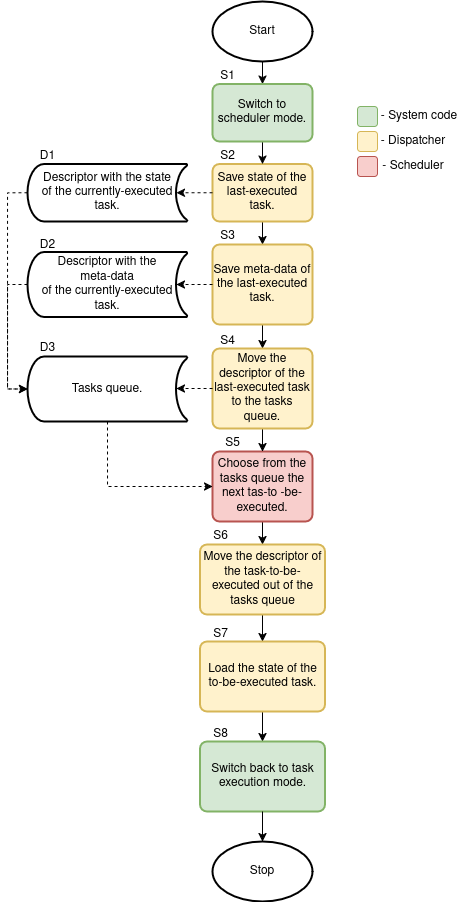 Created while waiting for update to Fedora 43, I will reference this diagram as
“diagram 1”
Created while waiting for update to Fedora 43, I will reference this diagram as
“diagram 1”
The image above presents my understanding of an OS code responsible for task switching. That is, not all code that is being executed during a context switch should be called “scheduler”. There are other pieces of code being executed that are responsible for other critical features in the OS: the code that triggers the switch (the green blocks on the diagram above), and the dispatcher (the yellow blocks on the diagram above). But let’s find these pieces of code in the FreeRTOS kernel.
FreeRTOS scheduler
Now that we know a bit about the code responsible for task switching - we can try and find it in the FreeRTOS source code.
A quick digression
While preparing the part about FreeRTOS scheduler I got a problem: somehow, after I have switched to Fedora 43 I got problems with the image I built before the update. And here where the good-old debugging skills help solve the problem.
In the MCU world there are not a lot of logs like in Linux systems. Sometimes
the board just seems dead, because the issue occurred at the very beginning of
software execution. But in my case I had QEMU! Here is what I got from QEMU with
-d exec.
Trace 0: xPortStartScheduler
Trace 0: xPortStartScheduler
Linking TBs 0x7fbeb0015f80 index 1 -> 0x7fbeb0016540
Trace 0: xPortStartScheduler
Linking TBs 0x7fbeb0016540 index 1 -> 0x7fbeb0016780
Trace 0: xPortStartScheduler
Trace 0: xPortStartScheduler
Linking TBs 0x7fbeb00168c0 index 1 -> 0x7fbeb00169c0
Trace 0: xPortStartScheduler
Linking TBs 0x7fbeb00169c0 index 0 -> 0x7fbeb0016b40
Trace 0: xPortStartScheduler
Linking TBs 0x7fbeb0016b40 index 0 -> 0x7fbeb0016b40
Trace 0: xPortStartScheduler
It was stuck somewhere inside xPortStartScheduler, at the most critical
section of the FreeRTOS startup - scheduler start. And the QEMU with -d
in_asm showed:
----------------
IN: xPortStartScheduler
0x0000182c:  e7fe       b        #0x182c
So a branch to itself, huh? It seems the execution was stuck on some check
inside the FreeRTOS kernel. Hence, it was a high time for big guns - GDB with
GDB dashboard. After a few minutes
of debugging I landed in the xPortStartScheduler on the following line from
the FreeRTOS file task.c:
─── Source ─────────────────────────────────────────────────────────────────────────────────────────────
 404          {
 405              /* Check the FreeRTOS configuration that defines the number of
 406               * priority bits matches the number of priority bits actually queried
 407               * from the hardware. */
 408              configASSERT( ( portMAX_PRIGROUP_BITS - ulMaxPRIGROUPValue ) == configPRIO_BITS );
 409          }
 410          #endif
 411
 412          /* Shift the priority group value back to its position within the AIRCR
 413           * register. */
After a few scratches on my head I came to a conclusion that configPRIO_BITS
has an incorrect value assigned. As one can see the cmp on address
0x00001814 compares two values: the value of the r3 which is the result of
portMAX_PRIGROUP_BITS - ulMaxPRIGROUPValue and the 8 constant value which is
the value assigned to configPRIO_BITS:
─── Assembly ───────────────────────────────────────────────────────────────────────────────────────────
 0x00001808  xPortStartScheduler+82  cmp	r3, #128	@ 0x80
 0x0000180a  xPortStartScheduler+84  beq.n	0x17ec <xPortStartScheduler+54>
 0x0000180c  xPortStartScheduler+86  ldr	r3, [pc, #124]	@ (0x188c <xPortStartScheduler+214>)
 0x0000180e  xPortStartScheduler+88  ldr	r3, [r3, #0]
 0x00001810  xPortStartScheduler+90  rsb	r3, r3, #7
 0x00001814  xPortStartScheduler+94  cmp	r3, #8
 0x00001816  xPortStartScheduler+96  beq.n	0x182e <xPortStartScheduler+120>
 0x00001818  xPortStartScheduler+98  mov.w	r3, #5
 0x0000181c  xPortStartScheduler+102 msr	BASEPRI, r3
 0x00001820  xPortStartScheduler+106 isb	sy
─── Breakpoints ────────────────────────────────────────────────────────────────────────────────────────
[1] break at 0x000017bc in /home/danik/Documents/Projects/GraduateWork/Code/FreeRTOS/FreeRTOS/Source/portable/GCC/ARM_CM3/port.c:364 for xPortStartScheduler hit 1 time
─── Registers ──────────────────────────────────────────────────────────────────────────────────────────
           r0 0x00000001           r1 0x00000002             r2 0x2000ff10           r3 0x00000003
           r4 0x00000000           r5 0x00000000             r6 0x00000000           r7 0x2000ff70
           r8 0x00000000           r9 0x00000000            r10 0x00000000          r11 0x00000000
          r12 0x00000008           sp 0x2000ff70             lr 0x00000693           pc 0x00001814
         xpsr 0x81000000          msp 0x2000ff70            psp 0x00000000      primask 0x00000000
      control 0x00000000      basepri 0x00000005      faultmask 0x00000000
─── Source ─────────────────────────────────────────────────────────────────────────────────────────────
 404          {
 405              /* Check the FreeRTOS configuration that defines the number of
 406               * priority bits matches the number of priority bits actually queried
 407               * from the hardware. */
 408              configASSERT( ( portMAX_PRIGROUP_BITS - ulMaxPRIGROUPValue ) == configPRIO_BITS );
 409          }
 410          #endif
 411
 412          /* Shift the priority group value back to its position within the AIRCR
 413           * register. */
And in case the values do match the execution jumps to address 0x0000182e and
the scheduler is being initialized and started, otherwise it continues execution to
0x00001818 that is a part of the port-specific function vPortRaiseBASEPRI
written in inline assembly that actually resulted in the “branch to itself”
instruction b #0x182c.
The solution was simple: assign value 3 to configPRIO_BITS. I am not sure
how much time I would have spent without GDB.
Back then, when Istarted my thesis, I did not know about QEMU, so I had to compile the FreeRTOS on some real hardware (I had a STM Nucleo-64 with STM32F401RE MCU in my disposition back then) and go through an entire FreeRTOS code up to running tasks to catch how the scheduler-related code and variables are being initialized and then used during runtime. It was a pretty harsh warm up considering my close to zero knowledge about such systems. But now I have the stack of knowledge and needed infrastructure from the completed thesis and we can start from a lower entry level.
I will explain the reason I used QEMU instead of real hardware in my thesis later, when I will approach the scheduler algorithms analysis, so the problem will be more clear. For the impatient one: read the part “5.1 Używana platforma” of my thesis for the reason of using QEMU, and the part “5.2.1 Problemy i założenia” of my thesis for the consequences of using QEMU.
The system initialization
Now I can get back to the FreeRTOS_QEMU.elf I have presented in Launching
a minimal build on QEMU and inspect the
qemu.log file generated there from the very beginning. Apart from other
FreeRTOS functions let’s focus on the following functions:
Note: You can delete some useless information from the
qemu.logby execution:%s/0: [0-9]x[0-9a-zA-Z \[\/]*]/0:in Neovim. This will make analysis easier.
Trace 0: ResetISR
(...)
Trace 0: main
Trace 0: xTaskCreate
(...)
Trace 0: prvInitialiseNewTask
(...)
Trace 0: vListInitialiseItem
(...)
Trace 0: prvAddNewTaskToReadyList
(...)
Trace 0: prvInitialiseTaskLists
(...)
Trace 0: main
Trace 0: xTaskCreate
(...)
Trace 0: main
Trace 0: vTaskStartScheduler
Trace 0: xTaskCreate
(...)
Trace 0: xPortStartScheduler
(...)
Trace 0: vPortSetupTimerInterrupt
(...)
Trace 0: xPortStartScheduler
Trace 0: prvPortStartFirstTask
(...)
Trace 0: SVC_Handler
(...)
Trace 0: Task2
(...)
Note:
(...)means I have hidden some lines fromqemu.logthat are not worth presenting, e.g. memory init. functions or other functions that are not important from a system point of view.
Going from the first function to the last:
ResetISR: CPU reset handler located at address 0 in its interrupt service routine vector (at least for ARM Cortex-M3 on which the ELF is built upon). This is the place from where we get intomain()after CPU reset.- The first
main: Themain()where the tasks are being registered and the FreeRTOS scheduler is being started. An example can be found in the previous chapter. - The first
xTaskCreate: The place where theTask1is being initialized and registered to FreeRTOS. Apart from the actualTask1stuff (theprvInitialiseNewTask,vListInitialiseItemand theprvAddNewTaskToReadyList) one additional function is being called: theprvInitialiseTaskListswhich creates and initializes the task queue (theD3from thediagram 1). - The second
main: At this point the task queue has been created andTask1has been added to it. - The second
xTaskCreate: The place where theTask2is being initialized and registered to FreeRTOS (that is, being added to the task queue). - The third
main: At this point the task queue contains two tasks:Task1andTask2. - The
vTaskStartScheduler: The place where scheduler is started, that does the following:- Calls the
xTaskCreateagain to create an “idle task” that is being executed if there are no other tasks that are ready to be executed. You can inspect theqemu.logforprvIdleTask- this is the actual “idle task”. - Then goes inside the MPU-specific routine
xPortStartScheduler, which does configuration and launches the SysTick interrupt (thevPortSetupTimerInterrupt) and switching execution to the first task in the task queue (theS7from thediagram 1; theprvPortStartFirstTask).
- Calls the
- The
SVC_Handler: TheprvPortStartFirstTask“yelds” to the low-level dispatcher stepS7from thediagram 1to load the state of the to-be-executed task from the queue (for the classic FreeRTOS scheduler it is the task with the higher priority during registration) -Task2.
At this point the system has been initialized and is running: the scheduler is switching execution between tasks using classic FreeRTOS policy, and the tasks execute.
The important note here is that every time the prvAddNewTaskToReadyList() and
prvInitialiseNewTask() are being called the scheduler’s code is being executed
to determine, whether the newly-registered task should be executed next or
should be placed in the task queue. Whether there is actually a need to execute
scheduler code during task initialization actually depends on the scheduler
policy being used. For example, let’s use an analogy from medicine to explain
this.
You have probably met two strategies used for providing treatment to injured individuals in clinics:
-
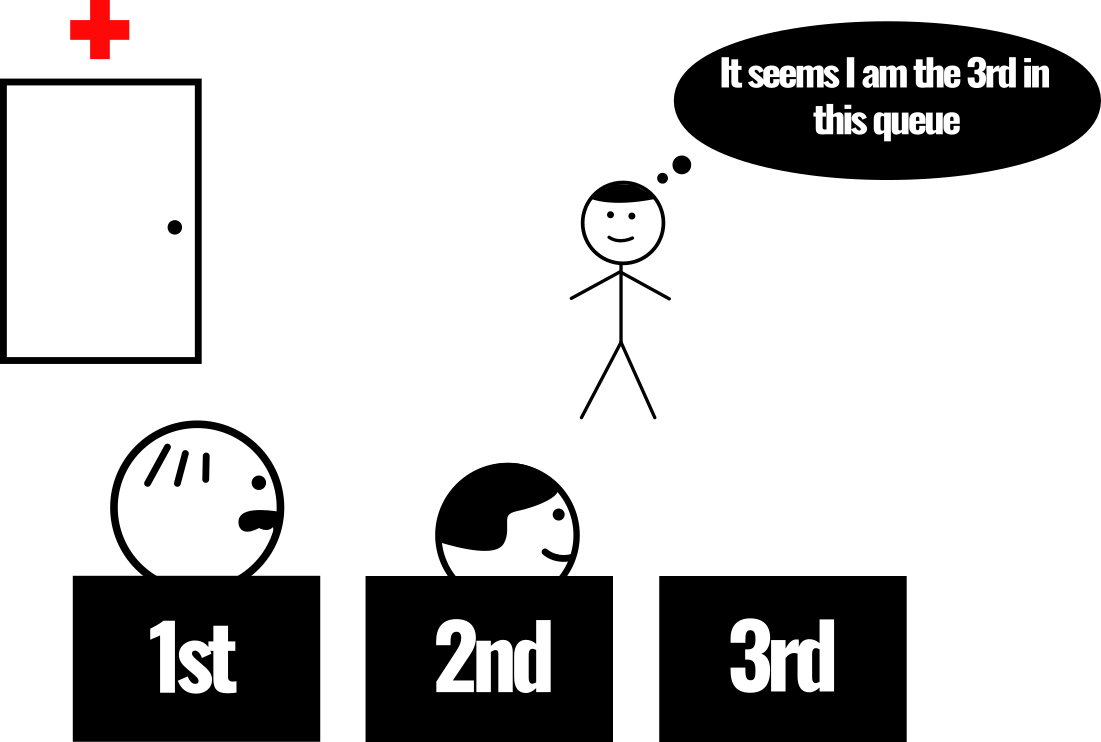
First come, first served (aka. FCFS or FIFO): A new person comes and sees the only queue with several people already waiting. The person knows the rules - he should join as the last one in the queue.
-
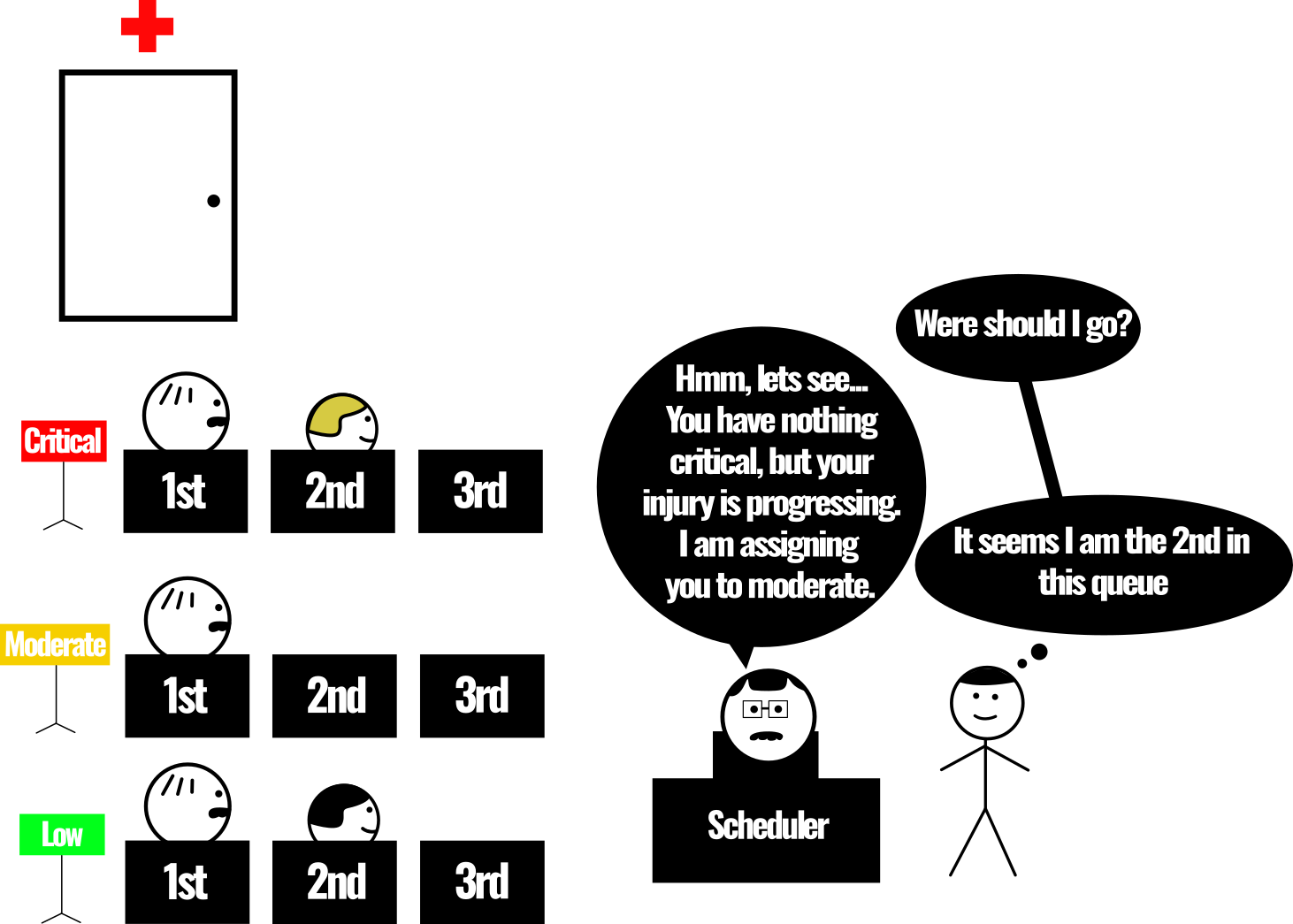
Triage or priority queues: A new person comes and is being assigned to a specific queue depending on the policy used by this clinic. Depending on the priority assigned - the person will be treated sooner or later.
Here are some examples:
- Priority assignment of a classic FreeRTOS scheduler: link.
- Priority recomputation for RM (aka. Rate Monotonic) scheduler I integrated into FreeRTOS kernel: link.
- Priority assignment of a DARTS (aka. Dynamic Real Time Task Scheduling) scheduler I integrated into FreeRTOS kernel: link.
As you can see, the way the task receives the priority during registration and the task queue implementation depends on the scheduler policy. Hence I will describe the implementation of these pieces of system code alongside the specific scheduler policies implementations.
The vPortSetupTimerInterrupt() and the prvPortStartFirstTask() should be
inspected closely, though. As the names of the function contain Port it means
they are hardware-specific and can be found
here and
here.
The vPortSetupTimerInterrupt() sets up
the SysTick interrupt frequency using configCPU_CLOCK_HZ
and configTICK_RATE_HZ, you can read more about this in
the FreeRTOS reference manual. The SysTick is a
periodic interrupt that periodically triggers
rescheduling (hence it is the trigger for the workflow from
the diagram 1). There are other places that trigger FreeRTOS rescheduling in
the FreeRTOS kernel source code. All of these places could be recognized by
yielding the PendSV handler.
The prvPortStartFirstTask() prepares the CPU for the state of the
to-be-executed task and yields to the PendSV
handler to load the state of the to-be-executed task
(according to S7 from the diagram 1) and switches execution to it
(according to S8 from the diagram 1).
Switching between tasks
System yelds for rescheduling
For the analysis of the process of switching between tasks I will use logs from the chapter Launching a minimal build on QEMU:
Trace 0: Task1 <- Task1 is being executed
Trace 0: vTaskDelay <- Task1 enters its delay function
Trace 0: vTaskDelay
Trace 0: prvAddCurrentTaskToDelayedList
Trace 0: uxListRemove
Trace 0: prvAddCurrentTaskToDelayedList <- Task1 is being delayed
Trace 0: prvAddCurrentTaskToDelayedList
Trace 0: prvAddCurrentTaskToDelayedList
Trace 0: vTaskDelay
Trace 0: vPortEnterCritical
Trace 0: vPortEnterCritical
Trace 0: xTaskResumeAll
Trace 0: xTaskResumeAll
Trace 0: vPortExitCritical
Trace 0: vPortExitCritical
Trace 0: xTaskResumeAll
Trace 0: vTaskDelay
Trace 0: PendSV_Handler
Trace 0: PendSV_Handler
Trace 0: vTaskSwitchContext <- Scheduler switches between Task1 and Task2
Trace 0: PendSV_Handler
Trace 0: PendSV_Handler
Trace 0: PendSV_Handler
Trace 0: Task2 <- Task2 is being executed
Remember I said There are other places that trigger FreeRTOS rescheduling in
the FreeRTOS kernel source code. in the previous
chapter. In the logs above you can see other places
where the FreeRTOS kernel code yelds to the PendSV handler
and triggers rescheduling - the vTaskDelay() here or
here. So the vTaskDelay() is the S1 from diagram 1.
The reason the vTaskDelay() must yield for rescheduling is because when a
certain task is delayed the CPU should execute some other task, it cannot
execute nothing. So the vTaskDelay() yields for the scheduler to switch to the
next task in the task queue (the D3 from the diagram 1) or to the
prvIdleTask.
Then vTaskDelay() calls prvAddCurrentTaskToDelayedList() to do the S3 and
S4 from the diagram 1. Then the vTaskDelay() yields to the
PendSV_Handler() which does the S2 from diagram 1 and calls the
vTaskSwitchContext() to do the S5 from diagram 1. The
vTaskSwitchContext() executes the scheduler. The
scheduler selects the to-be-executed task using its policy (the step S5 from
the diagram 1) and assigns it to pxCurrentTCB (the step S6 from the
diagram 1) hence telling the PendSV_Handler() to load its state in the S7
from the diagram 1, and switch execution to the task according to the S8
from the diagram 1.
This happens when one task is being delayed by some of the FreeRTOS’es delay
functions (yeah, there are other delay functions in FreeRTOS apart from the
vTaskDelay()).
Task preemtion
There is another case, when one task with higher priority (the Task1) preempts
another task with lower priority (the prvIdleTask). Here is an example from
the qemu.log:
Trace 0: prvIdleTask
Trace 0: SysTick_Handler
Trace 0: SysTick_Handler
Trace 0: xTaskIncrementTick
(...)
Trace 0: SysTick_Handler
(...)
Trace 0: PendSV_Handler
Trace 0: PendSV_Handler
Trace 0: vTaskSwitchContext
Trace 0: PendSV_Handler
Trace 0: PendSV_Handler
Trace 0: PendSV_Handler
(...)
Trace 0: xTaskIncrementTick
Trace 0: SysTick_Handler
Trace 0: SysTick_Handler
Trace 0: vTaskDelay
Trace 0: Task1
As you can see during execution of the prvIdleTask (the idle task in FreeRTOS
always has the lowest priority compared to other tasks in the system) a
periodic SysTick interrupt occurs which calls the
xTaskIncrementTick which checks whether there are tasks
that are ready to be executed (in this case the Task1 that entered a delay
list a few SysTicks before is now finished waiting and is ready to be executed)
and if there are - performs the S3 and S4 from the diagram 1, and then
signals the SysTick_Handler() to yield for a rescheduling. Then the process is
the same as when the system yields for rescheduling but instead of the
vTaskDelay() the SysTick_Handler() yields for rescheduling here. The
PendSV_Handler() does the S2 from diagram 1 and calls the
vTaskSwitchContext() to do the S5 from diagram 1. The
vTaskSwitchContext() executes the scheduler. The
scheduler selects the to-be-executed task using its policy (the step S5 from
the diagram 1) and assigns it to pxCurrentTCB (the step S6 from the
diagram 1) hence telling the PendSV_Handler() to load its state in the S7
from the diagram 1, and switch execution to the task according to the S8
from the diagram 1.
Summing up
Now that I have revealed the places where the scheduler is hidden in FreeRTOS - I can continue with the scheduler policies I added to FreeRTOS kernel:
- FCFS or First Come First Served: the FreeRTOS Kernel commit.
- SJF or Shortest Job First: the FreeRTOS Kernel commit.
- SRTN or Shortest Remaning Time Next: the FreeRTOS Kernel commit.
- RR or Round Robin: the FreeRTOS Kernel commit.
- RM and DM or Rate-Monotonic and Deadline-Monotonic: the FreeRTOS Kernel commit.
- EDF or Earliest Deadline First: the FreeRTOS Kernel commit.
- Preemptive EDF: the FreeRTOS Kernel commit.
- LST (aka. LLF) or Least Slack Time (aka. Least Laxity First): the FreeRTOS Kernel commit.
- Preemtive LST (aka. preemptive LLF): the FreeRTOS Kernel commit.
- DARTS or Dynamic Real Time Task Scheduling: the FreeRTOS Kernel commit.
I think I will create a small blogpost for every implementation.